Qwen vs Deepseek: One wins with half the token price.
Models tested
- Model A: Qwen3.8 Flash (
qwen3.8-flash), run through oh-my-pi (omp), thinking level medium - Model B: DeepSeek V4.1 Flash (
deepseek-v4.1-flash), run through the same omp setup, thinking level high at the end of the run - Use case: coding - build a small working app end to end from one prompt
- Why these two: they cost about the same per token, so this is a fair price-for-price comparison. Each model got its own empty folder and the exact same prompt, with no help from me mid-run.
Prompts I used
Build a small personal expense tracker as a self-contained Python web app using only the standard library (http.server, sqlite3, unittest). No pip installs, no external services, no API keys.

Deliverables:
1. app.py - an HTTP server on port 8000 with:
   - POST /expenses accepting JSON {amount, category, date (YYYY-MM-DD), optional note}; reject invalid input (missing fields, negative or zero amount, malformed date) with a 400 and a clear error message
   - GET /expenses returning a JSON list, supporting ?category= and ?month=YYYY-MM filters
   - GET /summary returning totals grouped by category and by month
   - GET / serving a single HTML page that lists all expenses and has a working add-expense form (no frameworks, vanilla JS fetch is fine)
2. SQLite persistence in expenses.db, created automatically on first run.
3. tests/ using unittest, covering: adding a valid expense, each validation error case, the category and month filters, and summary correctness. Every test must pass.
4. README.md with the exact commands to run the server and the tests.
5. A final demo run: start the server, add 5 sample expenses across at least 2 categories and 2 months, then show the output of GET /summary.

Acceptance criteria:
- python -m unittest discover -s tests -v runs with all tests green
- The server starts with python app.py and every endpoint above behaves as specified
- The HTML page renders and its form actually adds an expense end to end
- Nothing beyond the Python standard library is required

Work in the current empty folder. When finished, print the full test output and the demo summary output.
Tasks & results
Task 1 - Build the full app from one prompt
- Input: the prompt above, once per model, fresh empty folder each.
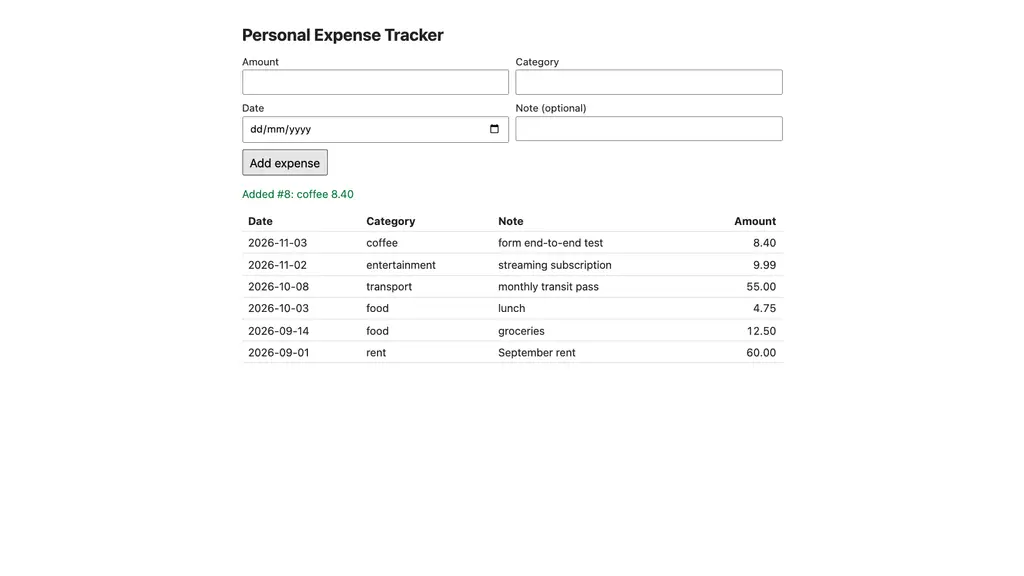
- Output, Qwen3.8 Flash: app.py (about 330 lines), 19 unittest tests, README, auto-created expenses.db. All 19 tests passed ("Ran 19 tests in 9.651s, OK"). The first test run had 3 failures: 2 were wrong expectations in its own tests (sort order), and 1 was a real gap in the app, where
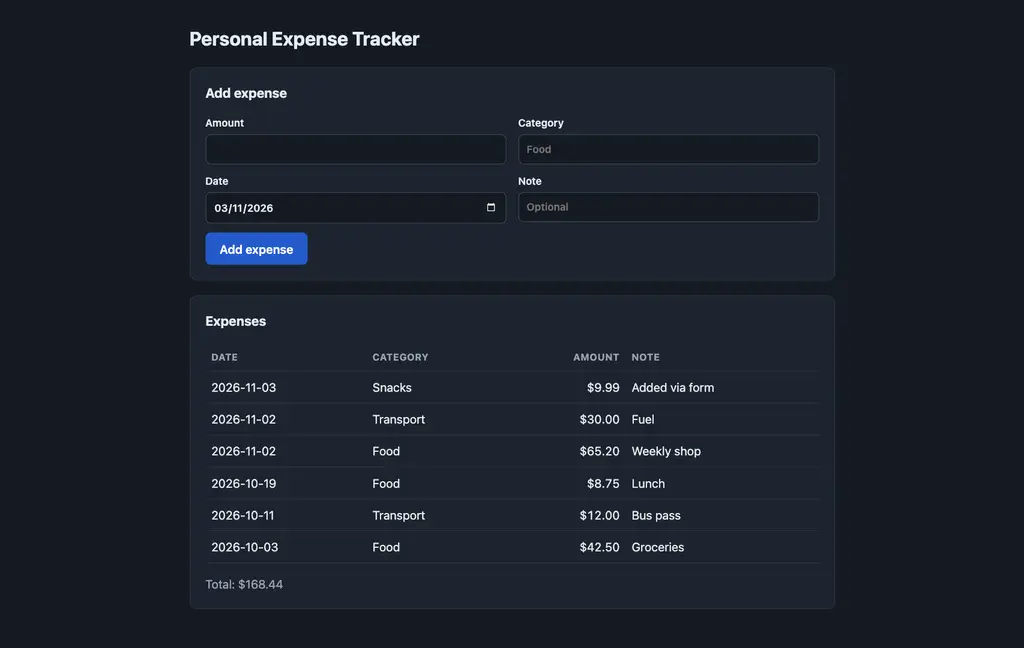
?month=2026-13passed the format check but isn't a real month. It fixed both the app and the tests, and the second run was green. It also ran a real Chromium check: filled the form, clicked Add, got "Added #8: coffee 8.40", and the table grew from 5 to 6 rows. - Output, DeepSeek V4.1 Flash: app.py (about 475 lines), 23 unittest tests, README, auto-created expenses.db. All 23 tests passed ("Ran 23 tests in 0.544s, OK"). The final report shows a green run. Its later edits hardened a few edge cases: huge amounts that overflow, an oversized request body (413), and cleaning up open HTTP error streams in tests. It also checked the form in headless Chromium: submitted "Snacks $9.99", and the row and total updated without a reload.
- Both servers started with
python app.py, both created the SQLite file on their own, and both used only the standard library.
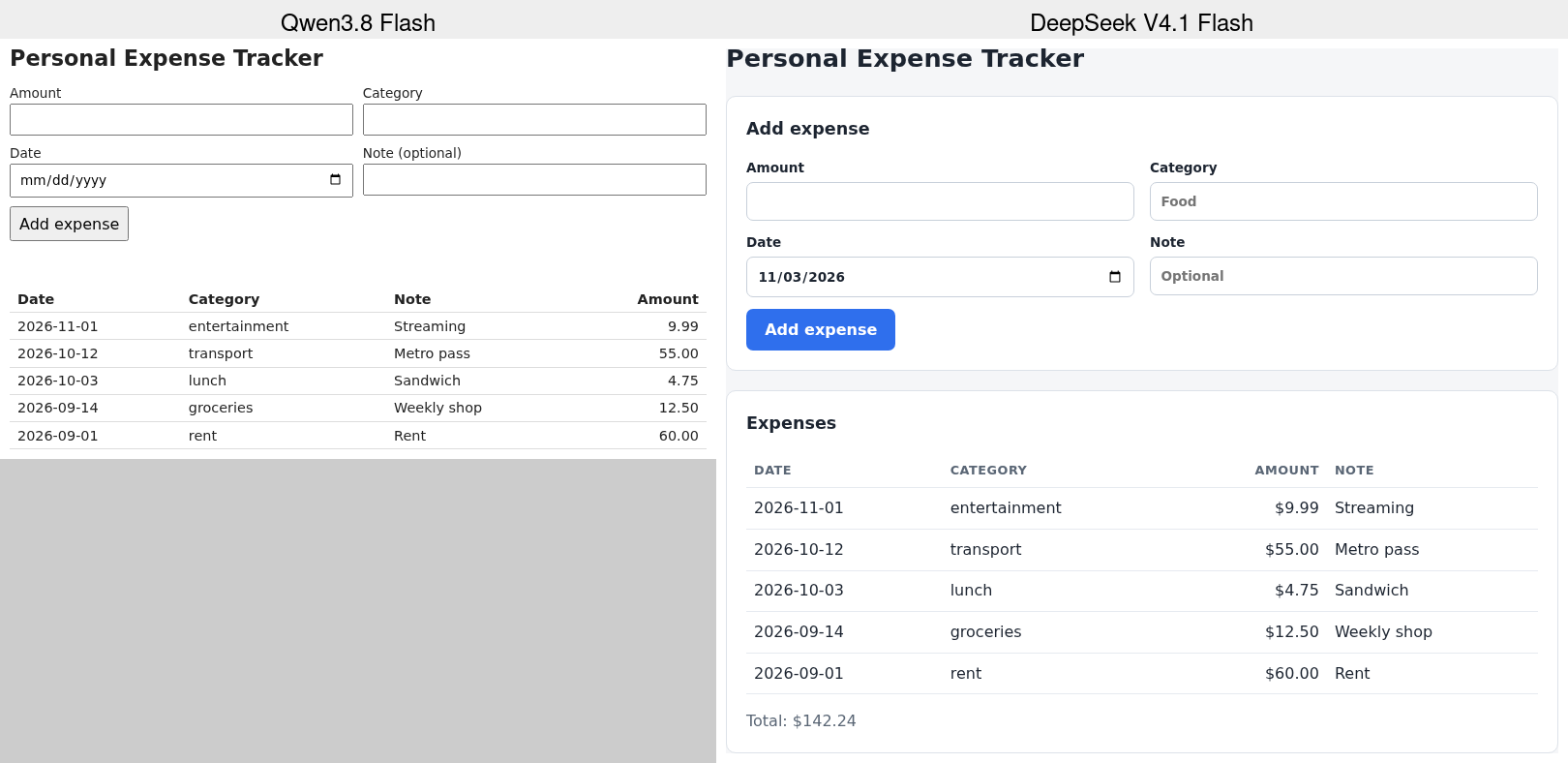
Screenshots (side by side, same 5 demo expenses loaded into each app):
The browser checks from inside each session:
Task 2 - The demo run and /summary output
- Input: add 5 expenses across 2+ categories and 2+ months, then call GET /summary.
- Output, Qwen: 5 expenses added, across 4 categories and 3 months, total 142.24. /summary returns a total, a count, and per-category and per-month totals with counts. It also spot-checked that amount 0 returns a 400 with "amount must be greater than zero".
- Output, DeepSeek: 5 expenses added across Food and Transport in 2026-10 and 2026-11. /summary returns plain
by_categoryandby_monthtotals (Food 116.45, Transport 42.0; 63.25 and 95.2 by month). That meets the prompt exactly, just with less detail than Qwen's version.
The UI difference (this is what I noticed first)
Qwen's page works, but it is a plain white page: default browser inputs, a grey default button, bare table, and amounts with no currency sign. DeepSeek's page looks like a small finished product: a card layout, a blue primary button, a light grey background, a styled table with uppercase column headers, $ on amounts, a running total, and a dark mode that follows the system theme (its own session screenshot shows the dark version). Nobody asked for styling in the prompt, so DeepSeek chose this on its own.
Cost
Recorded in the omp session exports:
| Item | Qwen3.8 Flash | DeepSeek V4.1 Flash |
|---|---|---|
| Input tokens (uncached) | 150 ($0.00002) | 41,585 ($0.0062) |
| Output tokens | 20,539 ($0.0097) | 21,854 ($0.0131) |
| Cache read tokens | 662,823 ($0.0106) | 891,136 ($0.0027) |
| Cache write tokens | 115,134 ($0.0230) | 0 |
| Model turns | 26 | 32 |
| Time spent in model calls | about 358 s | about 145 s |
| Total | $0.0433 | $0.0220 |
DeepSeek cost about half as much and spent less than half the model time. Most of Qwen's extra cost was cache writes.
My honest verdict
- What impressed me: Both models one-shotted a working app with a full test suite, real persistence and a form that works end to end, for pennies. Qwen found and fixed a real validation bug by running its own tests. DeepSeek wrote more tests (23 vs 19), handled more edge cases, shipped a much nicer UI, and did it for half the money and in less time.
- What fell short: Qwen's UI is plain and its run cost double.
- Worth it? DeepSeek V4.1 Flash wins this round, clearly. For building a small app from a spec it was cheaper, quicker, tested more, and produced the better-looking result.